
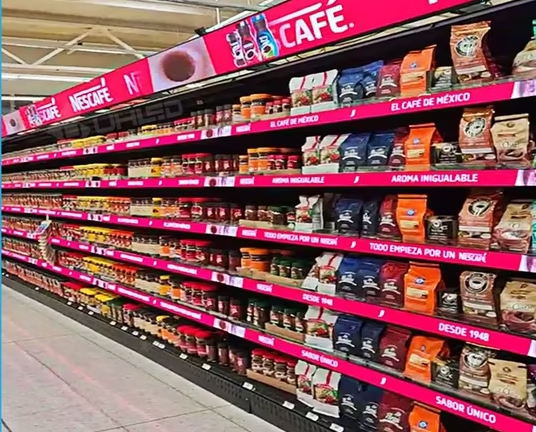
A shelf LED display is read from arm’s length, by a shopper who is already looking at the product next to it. That is a completely different job from a billboard or a video wall — and it changes everything about what to buy. Get the size, the brightness or the content system wrong and the strip becomes decoration nobody reads.
1. Start with the shelf, not the screen
Before comparing products, fix the job: supermarket shelves, a convenience-store aisle, a pharmacy or electronics display, or a shopping-mall showcase. Each one changes what matters — a supermarket shelf is long, low and read while walking; a showcase shelf is short and read while standing still.
Measure the real shelf first: its length, its depth, and how the strip will sit on its front edge. ILEDScreen’s iMini Shelf COB is a shelf display built for retail stores — an indoor LED strip that sits on the shelf edge itself. Ask the supplier how their display fits your exact shelf profile, not a standard shelf, and whether it mounts without rebuilding the shelving. A strip that needs new shelving is a different project with a different price.
2. Pick the pitch and brightness for arm’s-length viewing
A shelf display is read from half a metre away, in store lighting, often while the shopper is moving. That is the closest viewing distance of any LED display ILEDScreen sells — closer than a poster, far closer than a perimeter board — so the image has to hold up at very short range and still be readable without shouting over the products beside it.
No pixel pitch or brightness figure is published for the iMini Shelf COB, so do not choose on a number you have not been given. Ask the supplier in writing: the pixel pitch for your real viewing distance, the brightness for your store’s lighting, and whether the brightness can be adjusted — a strip that is too bright in a dim aisle is as unreadable as one that is too dim under spotlights. If they can only quote a pitch or brightness for a different model, ask again for the numbers of the configuration you are actually buying.
3. Check what it can show — price, promotion, or video
A shelf strip can do three different jobs, and the hardware you need depends on which one you want: static price and product information, changing promotions, or moving video. A strip bought for prices and used for video will disappoint; a video-capable strip bought only for prices wastes money.
Before ordering, say plainly what the content will be and how often it changes. Then ask how the content gets onto the strip: is it updated shelf by shelf, by aisle, or across the whole store at once — and from where? A supermarket chain that has to visit every shelf to change a price has bought a maintenance job, not a display. See the content system working, with your own kind of content, before committing to the hardware.
4. Ask about power, wiring and installation across many shelves
One shelf strip is easy. A hundred of them, across a store, is an installation project: power for every strip, cables that do not show, and a fitting method that does not slow down a store refit. This is where a shelf display is most often underestimated — the screen is cheap, the wiring is the work.
Ask for the power draw of the exact configuration, how the strips are powered and connected along a shelf run, and how long fitting takes per shelf. Get it in writing for your shelf lengths and quantities, not for a single sample. And ask what happens when one strip fails: can it be swapped without taking the shelf apart, and how fast do spares arrive?
5. Treat knocks, spills and cleaning as the specification
A shelf edge lives where trolleys bump it, stock is loaded over it, and staff wipe it down. A display that cannot take that life will look scuffed and dead within months, in the most visible place in the store.
The iMini Shelf COB is a COB shelf series — but no protection rating, operating temperature or cleaning guidance is published for it on record. That is exactly what to ask for in writing: the protection rating of the exact configuration, how the surface handles knocks and cleaning, and what the warranty covers when a strip is damaged in normal store use. Get the numbers for the configuration you are buying, not for a different model in the range.
6. Check the supplier behind the strip
A shelf rollout is rarely one order. A chain that fits one store will fit more, and every new store must match the first — same brightness, same colour, same size. That needs a manufacturer that is still there in year two, and that keeps batches consistent.
ILEDScreen is an OEM LED display manufacturer in Shenzhen, founded in 2019, operating a roughly 2,500 sqm factory with a team of around 20 people, and its displays are CE and RoHS certified. Ask any supplier the same questions before ordering: where the factory is, how long it has operated, and for the certificates for the exact model — documents, not a promise. Then ask how they keep colour and brightness consistent from one production run to the next, and order the strips for one rollout together where you can, so they come from as few batches as possible.
A short checklist before you ask for a quote
- Store type and shelf lengths, depths and profiles
- What the strip must show — price, promotion, or video — and how often it changes
- Pixel pitch and brightness for arm’s-length viewing, in writing
- How content is updated — per shelf, per aisle, or across the store
- Power draw, wiring and fitting time per shelf, for your quantities
- Protection rating and cleaning / damage handling, in writing
- CE and RoHS documentation for the exact configuration
- Batch consistency for repeat store rollouts, and spares availability
Send those answers with your shelf sizes and quantities, and a factory can quote the right display the first time. Contact ILEDScreen for a quote — or start from the product page: the iMini Shelf COB.